How To Use Blogger For Beginners

Blogger for Beginners
Do you know how to use blogger for a beginner? Most people that are just learning how to blog don't realize that they can avoid hosting fees and web design fees by using a free blogger account that is offered by Google. The great thing about blogger is that you can have more than one free blog at a time. If you have a Gmail account, you can create multiple blogs under that Gmail and there are no blogging hosting fees.
Unfortunately, the blog format that comes with a Gmail account looks like a blog, not like a professional website. As a matter of fact, it can be quite boring because the gadgets that Google has as defaults are "bloggish" looking. If you want to design your own website from your blog, you only need to make some simple changes to it. Once you learn how to set up a blog, or how to start a blog, then the gadgets are the next most important part.
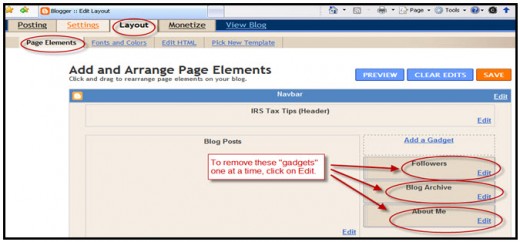
The best way to get rid of the ugly gadgets is to click on the "Layout" tab under Page Elements and then remove the gadgets that you don't like. The Layout tab is also the place where you add your own pictures, links, etc. to personalize your blog. Also, any gadget that you remove can be added back if you change your mind later.
With Google, there is no blogging software to buy, so you can have a professional looking website that can create a more profitable level of advertising for your business. You can use the flexibility of Google by creating blogs to do the advertising for you. With the tools available in Blogger, you can "link" each of the blogs to each other so anyone viewing your site will always stay on one of your sites and can't get lost by clicking off your blog to someone else's site. By using the tools available in Blogger such as text links, clickable pictures and anchor text, you can make your blog look fantastic to anyone reading it online.
If you change your free Google blog into a website then you have control of the content without having to pay a web designer to make changes for you. Create your own website and modify it easily whenever you want just by using the tools that are free inside every Gmail account.
If you decide that you would like to learn more about creating a blog, then you can check out my blog Make Your Own Website Now. You will be able to see exactly how I have used three gadgets on my blog. I have used a clickable image (top right), a non-clickable picture gadget (middle right), and a comment gadget (bottom) that allows people to comment on my blog. All of these gadgets were contained in the "Add a Gadget" function under "Page Elements" in the "Layout Tab".
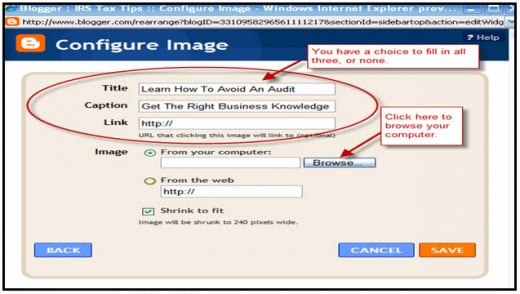
Another great function of the "Configure Image" gadget inside the "Picture" gadget is that you can type a Title (which appears above the picture) and/or a Caption (which appears below the picture). These are great placement ideas to help make your blog look more organized and businesslike. There are many gadgets that are offered by Google within a blog, so you can make your own website by trying them out yourself.
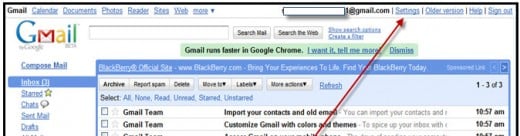
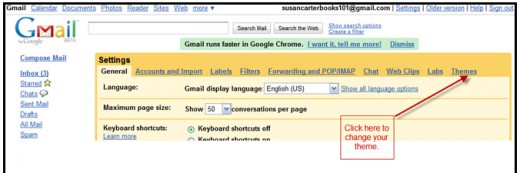
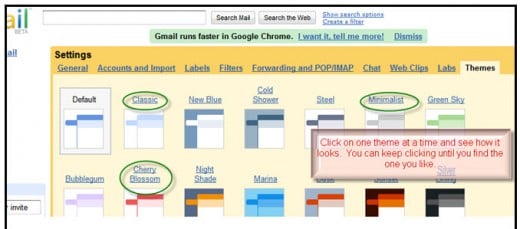
P.S. Would you like a quick "tip" that can make your Gmail account really cute? Check out the screen prints below to find out how you can change the background theme of your email. Google likes to add new themes every once in a while, so if you get bored, click on the Themes tab and see if any new ones are available.
I have multiple Gmail accounts for my business and personal so I like to liven them up and make them unique by giving each of them a different theme. It also helps me visually while I'm in the email to be able to tell which account I am logged into. Hope this helps brighten your day!
How to use blogger for beginners will greatly improve your ability to get out into the market and compete with other vendors with advertising that is powerful, but easy to learn. You can learn how to make money blogging if you know how to use the Google gadgets effectively. It is so important that you learn how to create a website that is sought after by the the search engines like Google, Yahoo, MSN and Bing so that you can drive your business name to the top of these search engines.
I hope these few tips has helped peek your interest in learning how to use blogger tools. Happy Blogging!
Make Your Own Website Now
- Make Your Own Website Now
This website talks about how you can avoid paying hosting and web designer fees by using the free blogger account that comes with every Gmail. You can also find out about the new eBook that gives specific instructions on how to create a great blog.